

What is Alibaba Cloud Monitor
Alibaba Cloud provides a fully managed, maintenance-free observability platform that enables one-click monitoring, tracing, and evaluation of Dify applications.Alibaba Cloud Monitor natively supports Python/Golang/Java applications through LoongSuite agents and open-source OpenTelemetry agents. In addition to one-click monitoring of Dify LLM applications, it also supports end-to-end observability of Dify components and their upstream and downstream dependencies through non-invasive agents.For more details, please refer to the Cloud Monitor documentation.
How to Configure Alibaba Cloud Monitor
1. Get Alibaba Cloud Endpoint and License Key
- Log in to the ARMS console, and click Integration Center in the left navigation bar.
- In the Server-side Applications area, click the OpenTelemetry card.
- In the OpenTelemetry panel that appears, select HTTP as the export protocol, and select the connection method and region according to your actual deployment.
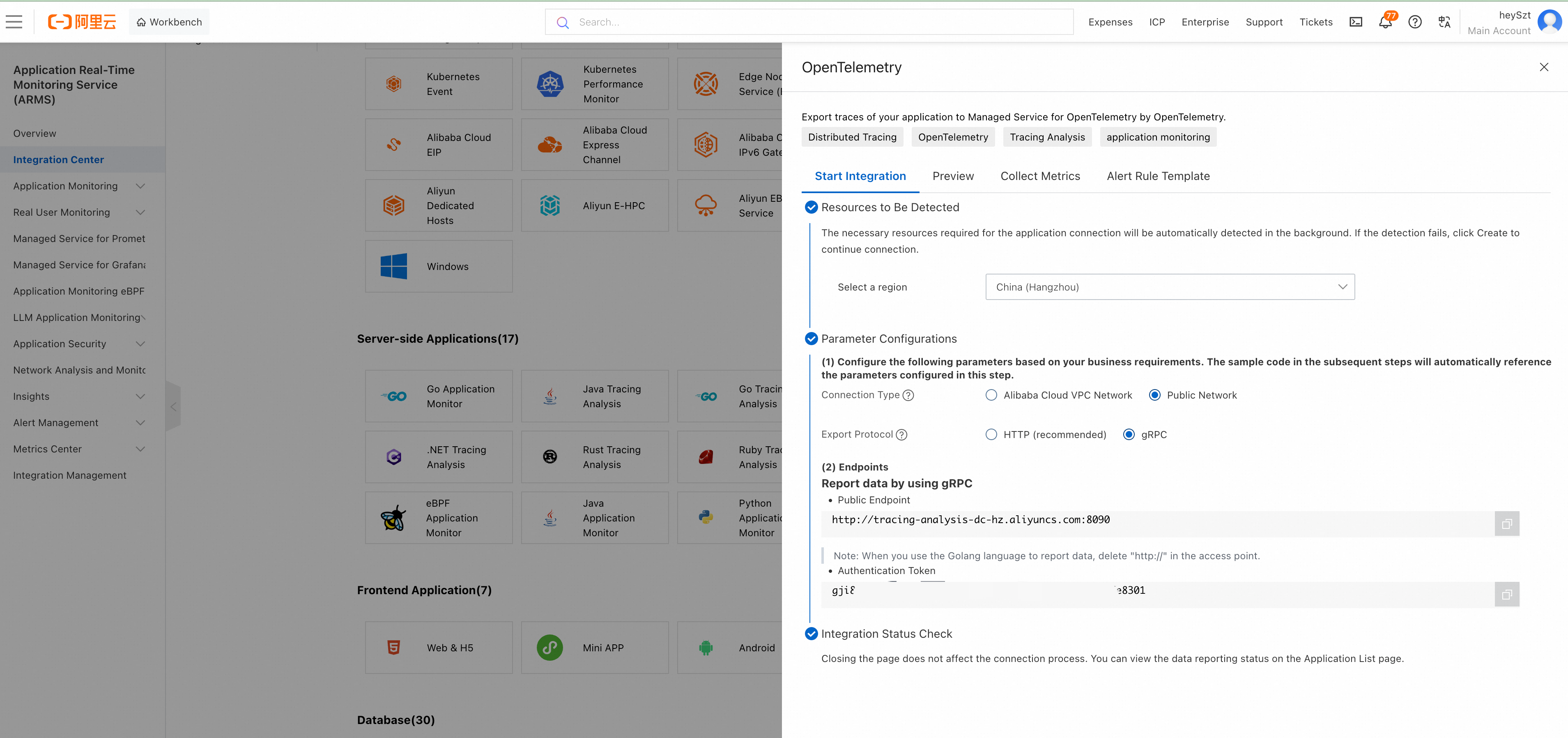
- Save the Public Endpoint and Authentication Token (License Key).
Use the HTTP(S) base URL as Endpoint, keeping the port if the HTTP collector requires one. Enter the token separately as License Key. Do not include
adapt_<key> or the ingestion path, and do not use the gRPC port 8090; Dify constructs the OTLP/HTTP ingestion URL.2. Configure Cloud Monitor in Dify
- Log in to the Dify console and navigate to the application you want to monitor.
- Open Monitoring in the left navigation bar.
- Click Tracing app performance, then click Configure in the Cloud Monitor area.
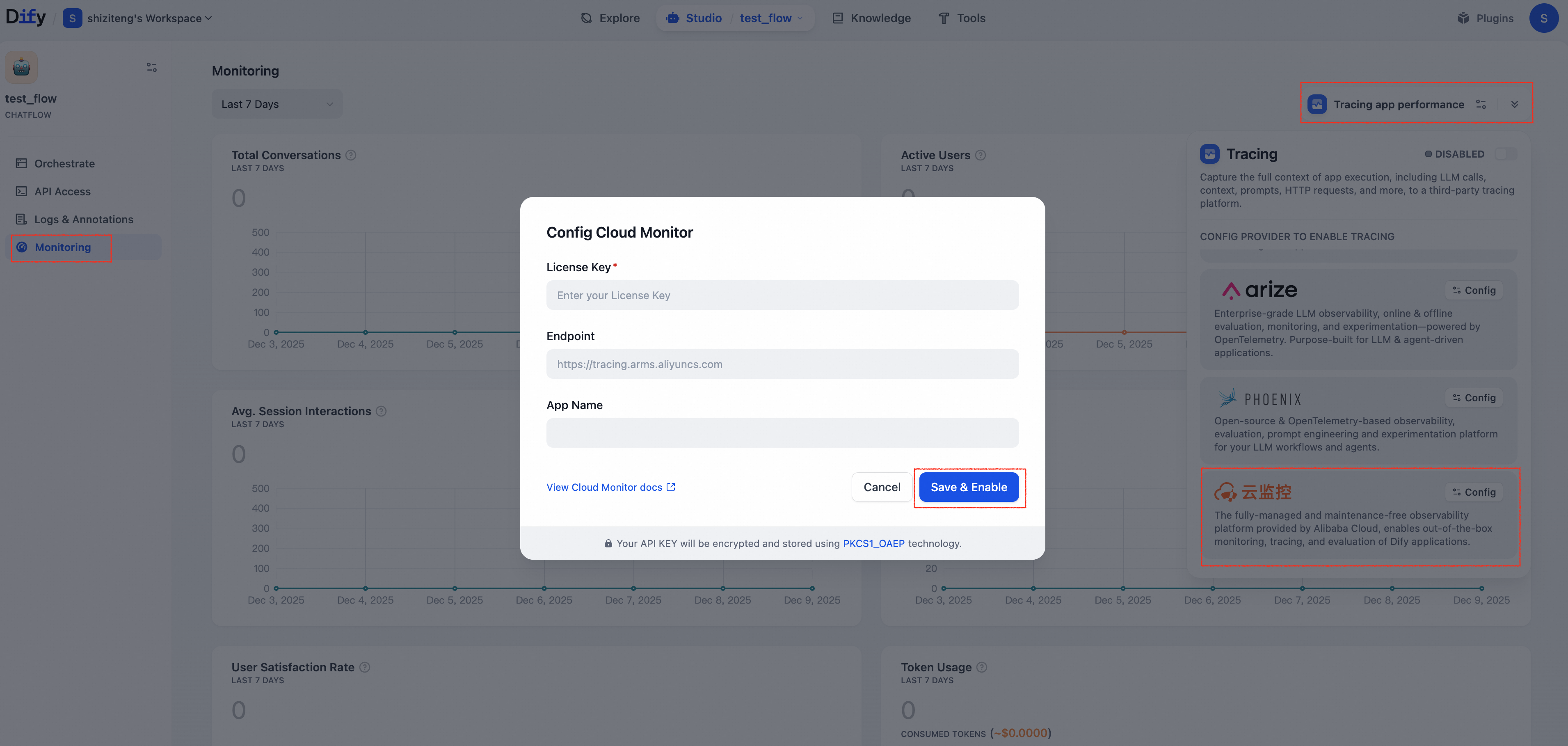
- In the dialog that appears, enter the License Key and Endpoint obtained in step 1, and customize the App Name (the application name displayed in the ARMS console), then click Save & Enable.
View Monitoring Data in Alibaba Cloud Monitor
After configuration, debug or production data from applications in Dify can be monitored in Cloud Monitor.Method 1: Jump to ARMS Console from Dify Application
In the Dify console, select an application with tracing enabled, go to Tracing Configuration, and click View in the Cloud Monitor area.Method 2: View Directly in ARMS Console
Go to the corresponding Dify application in the LLM Application Monitoring > Application List page of the ARMS console.After saving and enabling tracing, run the app again and check for a new trace in the monitoring service. Delivery is asynchronous; saving the configuration alone does not confirm that a trace has arrived.For the new Agent app type and workflows using the new Agent node, Capture content is off by default: inputs, outputs, and most metadata are removed, and error text is redacted across the whole workflow. Enable it to send that content. Classic
agent-chat apps and workflows using only classic Agent nodes retain ordinary tracing.Monitoring Data List
The tables below describe ordinary traces. For the new Agent app type or workflows containing a new Agent node, traces use a new UUIDv7 trace ID, with source and tracing-run IDs retained asdify.source.id and dify.tracing.run_id attributes. For the new Agent app type, Agent attempt spans with internal model and tool calls replace the ordinary llm span when Capture Agent internals is on. Separate moderation, suggested-question, and naming records are omitted for collected runs.
Dify exports a hierarchy of operations: a message contains an llm call, and a Chatflow message contains its workflow and node operations. Native token usage is reported on model calls only.
The detail lists below describe Dify’s source records and metadata. Only the relevant, available values are exported; the raw records are not sent in full.
Cloud Monitor supports collecting data from Dify’s Workflow/Chatflow/Chat/Agent applications, including execution details of workflows and workflow nodes, covering model calls, tool calls, knowledge retrieval, execution details of various process nodes, as well as metadata such as conversations and user information.
Workflow/Chatflow Trace Information
| Workflow | Alibaba Cloud Monitor Trace |
|---|---|
| workflow_id | Unique identifier of the Workflow |
| conversation_id | Conversation ID |
| workflow_run_id | ID of this run |
| tenant_id | Tenant ID |
| elapsed_time | Duration of this run |
| status | Run status |
| version | Workflow version |
| total_tokens | Total tokens used in this run |
| file_list | List of processed files |
| triggered_from | Source that triggered this run |
| workflow_run_inputs | Input data for this run |
| workflow_run_outputs | Output data for this run |
| error | Errors that occurred during this run |
| query | Query used during runtime |
| workflow_app_log_id | Workflow application log ID |
| message_id | Associated message ID |
| start_time | Run start time |
| end_time | Run end time |
- workflow_id - Unique identifier of the Workflow
- conversation_id - Conversation ID
- workflow_run_id - ID of this run
- tenant_id - Tenant ID
- elapsed_time - Duration of this run
- status - Run status
- version - Workflow version
- total_tokens - Total tokens used in this run
- file_list - List of processed files
- triggered_from - Trigger source
Message Trace Information
| Message | Alibaba Cloud Monitor Trace |
|---|---|
| message_id | Message ID |
| message_data | Message data |
| end_user_session_id | User’s session_id |
| conversation_model | Conversation model |
| message_tokens | Number of tokens in the message |
| answer_tokens | Number of tokens in the answer |
| total_tokens | Total tokens in message and answer |
| error | Error information |
| inputs | Input data |
| outputs | Output data |
| file_list | List of processed files |
| start_time | Start time |
| end_time | End time |
| conversation_mode | Conversation mode |
- conversation_id - ID of the conversation to which the message belongs
- ls_provider - Model provider
- ls_model_name - Model ID
- status - Message status
- from_end_user_id - ID of the sending user
- from_account_id - ID of the sending account
- agent_based - Whether it is agent-based
- workflow_run_id - Workflow run ID
- from_source - Message source
- message_id - Message ID
Dataset Retrieval Trace Information
| Dataset Retrieval | Alibaba Cloud Monitor Trace |
|---|---|
| message_id | Message ID |
| inputs | Input content |
| documents | Document data |
| start_time | Start time |
| end_time | End time |
| message_data | Message data |
- message_id - Message ID
- ls_provider - Model provider
- ls_model_name - Model ID
- status - Message status
- from_end_user_id - ID of the sending user
- from_account_id - ID of the sending account
- agent_based - Whether it is agent-based
- workflow_run_id - Workflow run ID
- from_source - Message source
Tool Trace Information
| Tool | Alibaba Cloud Monitor Trace |
|---|---|
| message_id | Message ID |
| tool_name | Tool name |
| start_time | Start time |
| end_time | End time |
| tool_inputs | Tool inputs |
| tool_outputs | Tool outputs |
| message_data | Message data |
| error | Error information (if any) |
| inputs | Input content of the message |
| outputs | Answer content of the message |
| tool_config | Tool configuration |
| time_cost | Time cost |
| tool_parameters | Tool parameters |
| file_url | URL of associated file |
- message_id - Message ID
- tool_name - Tool name
- tool_inputs - Tool inputs
- tool_outputs - Tool outputs
- tool_config - Tool configuration
- time_cost - Time cost
- error - Error information
- tool_parameters - Tool parameters
- message_file_id - Message file ID
- created_by_role - Creator role
- created_user_id - Creator user ID